How does C64 lightgun work (not the Gun stick or Nintendo zapper)?
First of all it is not a real gun, it does not shoot anything. It shoots in the same way as your photo camera shoot pictures, by capturing light. It is a single pixel optical sensor and nothing more. It can only work with a CRT monitor and that must be a 50Hz or 60Hz type. (which is determined by the type of computer connected to it (PAL=50Hz or NTSC=60Hz). The lightgun sensor is much quicker then our eyes. And that's the only reason why it can work. Because it is able to detect the phosphor pixel lighting up very brightly at the moment the electron beam hits the screen at that spot while the picture is drawn 50 or 60 times a second. Because the computer knows exactly when each pixel is written, the computer will therefore also know which pixel (or set of pixels) the gun/pen is looking at once the signal of the lightgun/pen goes active. The computer saves this X,Y-coordinate in a register for every first lightpen signal of each frame. Every other signal of the lightgun during the same frame is ignored.
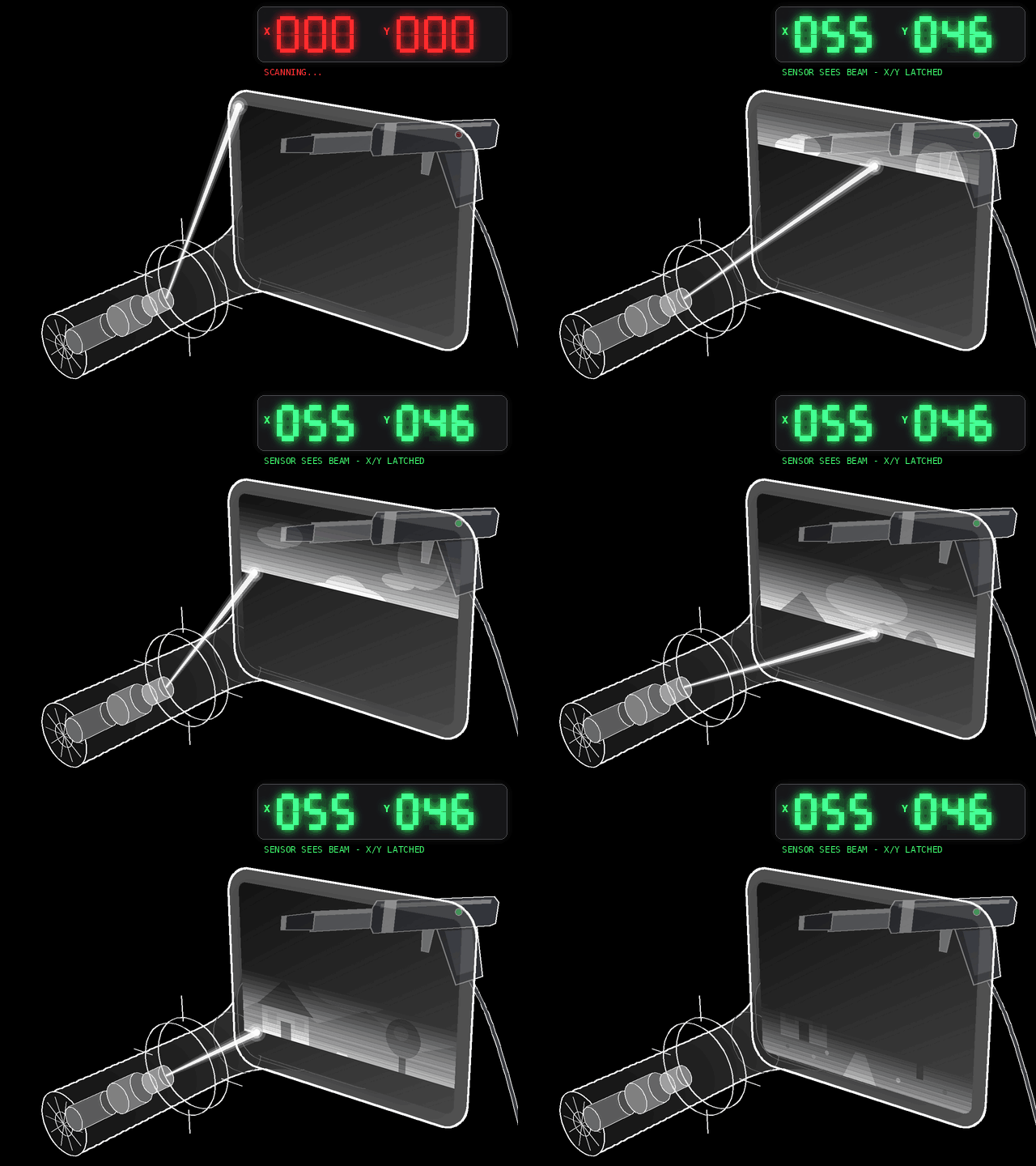
There is only one small catch... it doesn't work on black (or dark colors). Because there is no bright flash when a black (or dark) pixel is being drawn onto the screen, simply because there is nothing drawn onto the screen when a pixel is black. So a black pixel doesn't emit light and therefore cannot be detected by the lightsensor of the lightgun/pen. Depending on the sensitivity of the lightgun/pen other colors than white might work less reliably or not at all. You may improve the sensitivity of your lightgun/pen by changing the brightness setting of your CRT monitor to a higher brightness level as this will make the monitor/TV emit the most amount of light and therefore makes it easier for the sensor to detect it. If you want to write a game where you need to use a lot of dark colored target that you want to hit (or want to increase the overall sensitivity to all colors), then you can/must use a small trick. When the trigger is pulled, make the entire screen white (make sure to sync this to the start of a frame) one way would be to use the screen blanking flag of the VIC and set the background and border color to white for the duration of a single frame. It does produce a tiny "one frame" flash but it works and this flash might even be appealing depending on the type of game, since the flash could be imagined as a simulated muzzle flash from the gun. This trick is also used by the game "Operation Wolf" (which is a very good lightgun game for the C64). But as long as the programmer and the game itself allow for bright targets color(s) no tricks should be required.
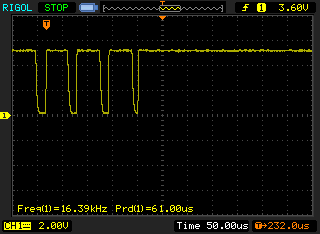
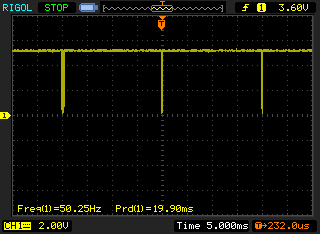
Now how does this lightgun sensor signal looks like on an oscilloscope? Well first of all, you'd most likely see more then one pulse coming from the gun. Because the light sensor will be activated for every bright pixel that is in the field of view of the sensor. And the sensor will in many cases see more than one line at a time. This is not a big deal because the hardware will only trigger on the line that is detected first, which is always the same line (if you have a steady aim). So if the sensor see 4 lines, it will always "snap" onto the top of those 4 lines, as that is the line the sensor sees to light up first.
On the first oscilloscope image the timebase of the scope is set to 50us, this allows us to capture the pulses generated by 4 bright lines in field of view of the lightgun.
 On the second oscilloscope image the timebase of the scope is set to 5ms, this allows us to capture multiple frames. Now the multiple pulses captured by the lightgun on each line are now hardly visible as the resolution of the scope does not allow us to see this, but they are still there.
Lightgun testing program:
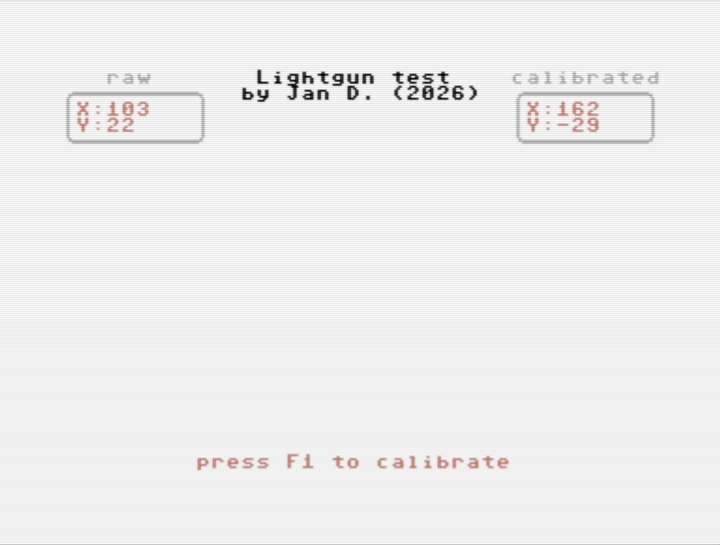
If you own a Stack light rifle, a Magnum light phaser or a compatible one, but you want to see how good it works without loading a game? Then here is a little test tool that might be of use to you. The program is very simple, it shows a cross hair at the location you are aiming at. If the cross hair does not show up at exactly the right location, you "calibrate" to compensate for the small offset by pressing F1 (press run/stop to exit calibration mode). Keep in mind that this calibration is only a temporary sollution that works in this test program. Some games have a calibrate option, other games don't. Therefore if you play a game that doesn't have a "calibrate" function but your lightgun does have a large offset you will have a hard time getting the perfect score. The only option would than to be to open up the lightgun, slightly re-adjust the photodiode (this is a task that requires patience and some skill). The other option is to accept that it is slightly off and adjust you aim accordingly. Click the link here to download the test program: LightgunTest.prg
 Note: this test program does not support the Gun stick lightgun, simply because the workings of this gun are fundamentally different in such a way that it is not possible to display it's functionality in a similar manor. The only thing that type of lightgun can do is check if it has been pointed at a specific X,Y-coordinate, it is not possible to instantly detect the current X,Y-coordinate. Attempting to detect the current aiming location would result in a constant and heavy flickering of the display, that would be painful to watch but also painfully slow if a decent resolution would be needed. Considering that this gun is rare and that the games (only 2 exist) are available on this website, it is suggested to "just play the game" to test it.
How do other lightguns work (like the Gun stick or Nintendo zapper)?
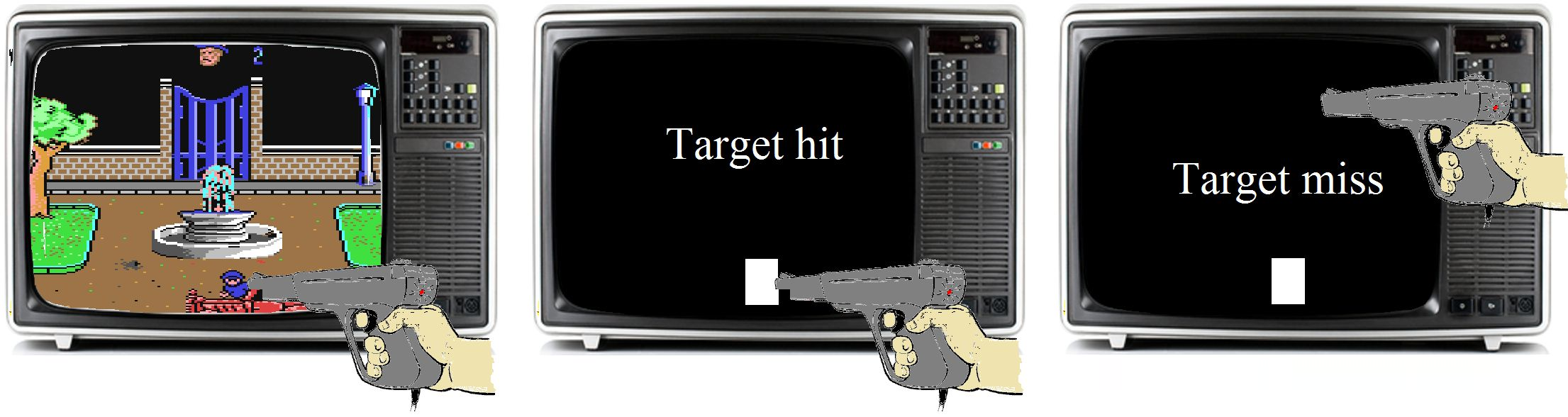
Again, this also isn't a real gun, it does not shoot anything. It captures light. It is a single pixel optical sensor and nothing more. The Nintendo zapper works like this: When the trigger is pulled, the screen goes black for 1 frame and during that frame the target(s) are replaced by a white block. When the gun is aiming at this block, this will result in a signal on the output of the gun, the computer detects this and knows that the gun has hit the target. When the gun was aiming somewhere else, the gun saw a black spot, generated no signal and the computer knows that the gun has missed. This means that this system suffers from a flickering effect when the trigger is pulled. However this effect is so small that it can hardly be noticed.
The whole idea behind this system is that it is simple, there is no special hardware required (lightpen input on the video chip and a latch to capture the X and Y-coordinate). This means that such a design can potentially work with all computer models, this because detection isn't depending on a special lightpen input directly connected to the video chip. This type of gun is easy to fake (unless prevented by the game). Simply point the gun towards a modulated light source, for instance a light bulb. Then the gun will constantly generate pulses, which the computer registers as a hit. If you have multiple targets, for instance 2 ducks and you need to detect which duck was hit, you need to flash a white block twice, once for every location of the duck on the screen.
Now you would expect that this also can only work in combination with a CRT monitor, but that isn't entirely true, in essence the gun is looking for a sudden bright spot caused by a large white block on the screen in the field of view of the lightgun. But if you have a monitor/TV that can supply the appropriate brightness level for triggering the photosensor in the lightgun then it can still function. Unfortunately, LCD displays always have a form of image buffering that causes the image on the screen to be slightly delayed (latency), meaning that when the computer assumes to have a white block on the screen, the screen might actually still be black and by the time the white block is shown on the screen, the computer is no longer checking for any sensor activity as it already has registered a miss. Attempt have been made to modify old games in order to compensate for this latency caused by the monitor/TV, but since not all monitors/TV are the same, results vary greatly. In other words, this technology also works best in combination with a CRT monitor/TV, because CRT's have no image buffering, the are drawing the video directly onto the screen and they do so very brightly. Now the brightness perceived may not look different, but that's because our eyes smooth out the brightness level over the duration of the frame.
Calibrate a lightgun?
Some games have the option to calibrate the lightgun, why is that? Calibration of a lightgun (or lightpen) is useful for various reasons. The main reason is that there are lot's of production tolerances in the positioning of the sensor inside the gun. So in order to compensate for a misaligned sensor behind the lens, the computer must know the created offset in the measured position in order to know where the user is pointing the gun at. So the computer draws a large white square of other image in the center of the screen. Then the user presses the trigger and the computer detect the signal of the gun. It is crucial that the user is pointing the gun at the correct location for a good calibration. Now the computer knows the offset (or error) in the position for X and Y. This offset is simply subtracted from the measured position during the game. That is why yu will hit your targets if you calibrate your gun.
But there is more. Not only the location of the sensor behind the lens is responsible for the offset in the X and Y position also the time delay in the circuitry of the gun. Keep in mind that the lightgun signal are very fast. Fast is a relative concept, but consider that the electronics are cheap, the cable is long and not shielded. All in all the lightgun design is not optimized for performance, it is optimized for profit and profit only. If not then the gun would be to expensive and nobody would buy it. As long as you don't forget to add a calibrate routine in your program there is no problem with the gun being cheap. Well back to the fast signals. The length of a video line is 64 uSec (pal), for 320 pixels + borders this means that for every uSec of delay you shift approx 8 pixels to the right. Well actually that would be 4 lightpen counts because the lightgun resolution is not 320 counts but 160. The Y has the full resolution of 200 pixels and delays in the circuitry do not affect the Y position. An X offset of 25 (that would be 50 pixels or approx 16% of you screens width) is considered normal. And no problem at all, because the lightgun/pens position is a full byte (255 is max value) this means that the theoretical allowable error may be up to 95 (PAL) and that would be a very bad aligned gun with a very long cable combined with a user that does not know how to aim at the calibration target.
When you spend a lot of components you can compensate for the delays in the cable and the circuitry itself, but there is absolutely no need, the C64 electronics can compensate without any problems for the offset error. But is there is somebody out there (for a brief moment I thought about it, using a precise delay to shift the X signal to the prefect position of the next line, nobody will notice that the Y position would be 1 pixels off) who thinks he/she is smart and wants to build a lightgun you do need need to calibrate then what would be the point, the available games still have the calibrate routines and some pop-up even if you do not need them and that never changes (so that's why I did not do that).
Why does my keyboard respond badly when a lightgun/pen is connected?
Not all lightgun/pen cause this problem but some do and that can be very annoying. Because the only way to solve it (without modifying the device) is to disconnect it and then plug it in when you need it. This problem lies in the fact that the keyboard shares IO-lines with the joystick ports. Normally this is not a problem, because when you do no use the joystick the IO-lines are not affected. A joystick consists of switches being closed when you move in a certain direction, closing these switches will short an IO-line to ground, which the computer can detect. But when the computer is scanning the keyboard while your are using the joystick then conflicts occur. The computer cannot determine if the signals changed because of a key press or by joystick movement. This problem is less noticeable with a joystick connected to port#2. This is (most likely) one of the reasons why many programmers chose to use port#2 in their games. Which made it confusing which port to use in case of single player games, resulting in Commodore users constantly swapping the joystick between port#1 and #2 depending on the game being played. The only proper sollution... by a second joystick and connect them both.
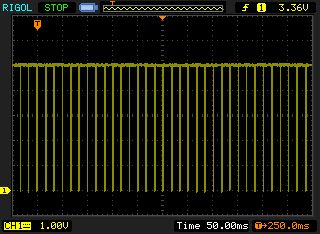
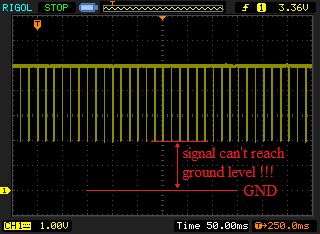
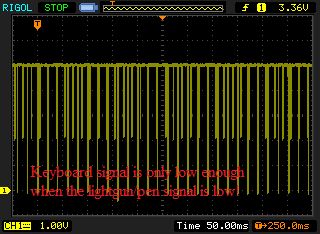
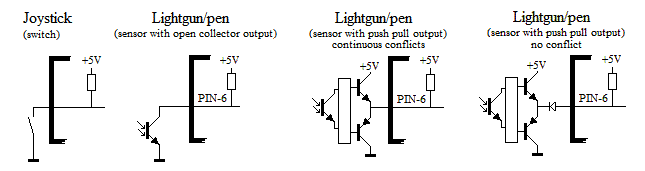
While a joystick is only a set of switches, a lightgun/pen sensor is much more sophisticated. Some designs mimic the switch approach by using open-collector circuits to drive the lightgun/pen signal. These will cause no problems if you leave the lightgun/pen untouched/pointing away from the screen (or lightbulbs), the keyboard IO-line connected to pin-6 of the joystick port#1 (while pressing the F1 key) looks like the image below (left). But the "better" or "high-end" sensors have a push-pull configuration (creates a better digital signal) but makes it very difficult for the keyboard matrix to drive the line low when a key is pressed. This is shown in the image below (middle). If you point the lightgun to the screen and push te F1 key, the the signal looks like the image below (right). You can see that the sensor prevents the IO-line from going low, but gets low enough when the sensor drives it low. Resulting is strange behavior of the keyboard while pressing the F1 key . Therefore if the keyboard wants to pull a line low while the sensor keeps pulling it high then we have a conflict. This does not cause damage (because the sensor can't supply much current) but it is enough to stop the keyboard from working properly.
Signals of IO-pin ($DC01 bit4, connected to joystick port#1, pin-6), while pressing the F1 key.
Normal operation (no lightgun/pen connected or lightgun/pen pointing away from screen or modulated light sources, the signal moves from 0 to 5V without problems.
 But when there is a conflict with lightgun/pen sensor and the keyboard scanning, some keys do not respond, since the lightgun prevents the shared line (which is also used by the keyboard matrix) to reach the 0V level!
 But when there is a conflict with lightgun/pen sensor and the keyboard scanning, some keys do not respond, the signal can't reach the 0V or 5V level when needed!
 How can this horror be fixed? For those who are capable of handling a soldering iron AND are willing to modify their lightgun/pen, there is a simple fix this problem.
All we need to do, is to prevent the sensor signal from being pulled high. Using a small Schottky diode. This diode allows the sensor to pull the signal down but prevents it from pulling it up. Reducing the push-pull output stage of the sensor to a open-collector stage. Regarding the signal quality of the lightgun/pen, this will not affect accuracy at all, because the computer is only looking for the fast going falling edge (1 to 0 transition) which is unaffected by the diode. The rising edge (0 to 1 transition) speed is determined by the pull-up resistor in the C64 which doesn't need to be super fast at all.
Below you see a simplified representation a joystick port input line. The most right image shows the conflict problem being solved by adding a simple diode (preferably a Schottky diode diode, because this has the lowest voltage drop). The diode prevents the push pull driver from pulling the PIN-6 line high, but enables it to go low. Just like the joystick, the image on the left. If you do not want to modify your lightgun/pen, then you can also add a small adapter that sits between the C64 and the lightgun/pen.
 Please keep in mind that there allays will be potential problems when reading the keyboard and using the Joystick/Lightgun/Lightpen simultaneously. However most of these can be avoided by choosing the right keys in your program (keys that are not affected by the connected input device) this way it doesn't matter that not every keys works as expected.
Using a lightgun/pen on a 100Hz television?
Technically this doesn't work, simply because the speed of the image drawn onto the CRT is double the speed of the PAL computer sending the signal to the TV. However... there is a possibility that there might be a game especially written to supports this, although keep in mind that these kind of televisions weren't available in the good old glory days of the Commodore. And now these are becoming obsolete, but there are still people around who want to play their C64 lightgun/pen games on these televisions, but most likely , those are just a few people. Depending on the frame buffer used in the television, the image is drawn in sync, but twice as fast. This means that the X and Y register of the gun will be halve the value for the same position on the screen compared to a normal 50Hz TV/monitor. Now imagine a game where you will never be able to get the lightgun/pen position to move beyond the halve maximum value, this will mean that you will never be able to hit anything on the right side of your screen.
Theoretically it should be possible to compensate for this, but it requires writing a game dedicated to the usage of 100Hz TV's, that a pretty niche market! Also it will have half the lightgun/pen resolution, so accuracy will also be reduced with 50%. Which isn't a big issue considering that aiming to a single pixel was an impossible challenge anyway. However how this works in practice still needs to be properly tested. One thing is clear, you simply can't achieve the perfect score on operation wolf using a 100Hz TV.
Using a lightgun/pen on a plasma or LCD television:
Technically this doesn't work, simply because the image is drawn not in the same way as a CRT monitor does. Therefore the image lacks the bright flash of the pixels when they are drawn, making it impossible for the lightgun/pen to detect it. For more modern systems then the C64 there were guns designed that work on a different principle but still were called lightguns. This is confusing. The reason why these guns can work with any kind of TVmonitor is the fact that they don't look at the monitor, they use a small box that emits light. The gun contains a much more sophisticated sensor that can track the position of the emitted light. When calibrated properly, the tracked position is then linked to a position of a cross hair on the screen. The WII-mote is such a controller (http://en.wikipedia.org/wiki/Wii_Remote) and technically you could say that this controller contains a tiny high speed video camera. To hide the light from the user, the light is infrared, which humans simply can't see.
Is it possible to convert a Wii controller so that we can use it on a C64 or other 8-bit computer?
Yes, and it isn't really all that difficult but there are some interesting challenges to get it right. It would involve removing the tracking camera from the WII controller and adding a small micro controller to read the info from the tracking camera. That position info must be converted into a signal send to the joystick port#1. However, this signal must also be synchronized with the video signal coming from the VIC chip of the C64. Which would simply be a matter of sensing the H and V sync signals. But you still would need the Wii light-bar underneath your TV/monitor/projection screen and a cable from the gun going to the composite video output and the joystick port#1. Now this all needs to happen relatively fast in order to minimize lag and unacceptable offsets. So although (with the modern components of today) it's doable it is also much more complicated than using a real lightgun and a real CRT, which is part of the experience. And let's face it, the workings of a lightpen and lightgun as implemented on the C64 is brilliantly simple since the main part of the system is the display itself, the pen/gun is just a fast photodetector aimed at a specific spot on the screen, no real fancy electronics needed.